Analysis Tab
About this chapter
This chapter explains how to read each item on the Analysis tab in the right panel of the natal chart (single wheel). The Analysis tab consists of summaries of the whole chart (moon phase, modality, element, and so on), the Dispositors chart, and the individual lists folded under Chart Details (tight aspects, Essential Dignity, Almuten, and so on).
The same information is available for composite and Davison charts on the Synastry page and, in part, on the Progression page (see "Seeing it on other screens" at the end).
The astrological meaning of each item, and how to interpret it, is outside the scope of this manual. Please rely on what you have learned in courses and books (see also Astrology Basics).
Opening the Analysis tab
Steps
- On the Natal page, press Show Chart.
- In the data tabs on the right, open Analysis (on a phone, it appears below the chart).
- From top to bottom you will see the summary items, the Dispositors chart (Pro and above), and Chart Details. Each item under Chart Details opens and closes when you click (tap) its heading (they are closed at first).
Notes
- Items under Chart Details that have nothing to show (for example, no tight aspects to list) are not displayed.
- For birth data with an unknown birth time, items that rely on the houses or the angles (ASC and MC) are not shown (see the description of each item).
- While a draconic chart (Dragon Head / Dragon Tail) is displayed, the Analysis tab itself is not shown.
- Everything on the Analysis tab except the Gauquelin sector planets and the Dispositors chart is also included in the natal printout (Essential Dignity is Pro and above).
Reading the summaries
The upper part of the Analysis tab shows the following items.
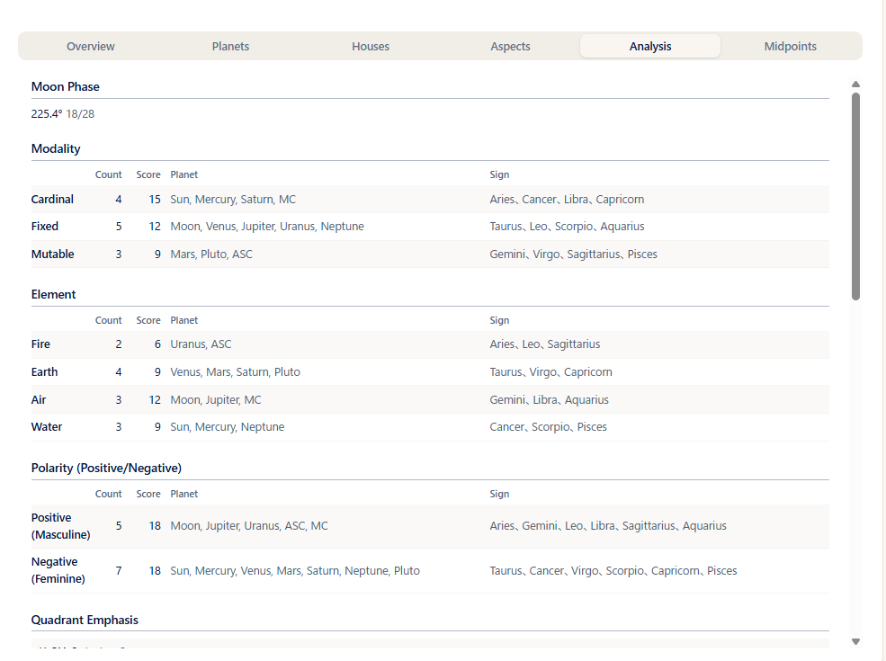
- Moon Phase: the elongation from the Sun to the Moon (in degrees) and the lunar day counted on a 28-day cycle (for example, 13/28). The same line is shown at the bottom of the Planets tab.
- Modality / Element / Polarity (Positive/Negative): rows for Cardinal, Fixed, and Mutable / Fire, Earth, Air, and Water / Positive (Masculine) and Negative (Feminine), with the following columns.
- Count: the number of planets in that group
- Score: a weighted total, in which each planet carries its own weight
- Planet: the planets in that group
- Sign: the signs that belong to that group
- When the birth time is unknown, the ASC and MC are left out of the totals.
- Quadrant Emphasis: divides the chart into four sections (11-2H, 2-5H, 5-8H, and 8-11H) and shows the number of planets in each, with their names. Because it uses the houses, it is not shown when the birth time is unknown.
- Gauquelin Sector Planets: for each of the ASC, MC, DES, and IC, lists the planets close to that angle (in its Gauquelin sector). An angle with no planet shows "-". When no angle has a planet, the item itself is not shown. When the birth time is unknown, the message "Not available when the birth time is unknown." is shown instead.
- Stellium: shows the signs in which planets are concentrated, and the planets in each. Hovering over the sign name shows the meaning of the sign. When there is none, the item itself is not shown.
- Critical Degrees: lists the planets in the first degree (0 degree) or the last degree (29 degree) of a sign, in the form "planet - 0 degree / 29 degree (degrees)". When there is none, the item itself is not shown.
- Dispositors: the chart of arrows tracing the rulers (Pro and above). See the Dispositors chapter.
Reading Chart Details
Tight aspects and planet lists
- Conjunction/Opposition (Tight): the conjunctions and oppositions with a small orb. The columns are planet 1 / aspect symbol / angle / planet 2 / orb.
- Other Tight Aspects: aspects other than conjunctions and oppositions with a small orb. The columns are the same as above.
- Most Aspected Planets: the planet with the largest number of aspects, and that number. If several planets tie, all of them are listed.
- Angular Planets: planets close to the ASC or MC. Not shown when the birth time is unknown.
- ASC Ruler: the ruler of the sign on the ASC. Not shown when the birth time is unknown.
- The four items above (the two tight-aspect lists, Most Aspected Planets, and Angular Planets) cover only the planets displayed by the selected preset. When the birth time is unknown, aspects that involve the angles (ASC, MC, and so on) are left out of the lists.
Essential Dignity (Pro and above)
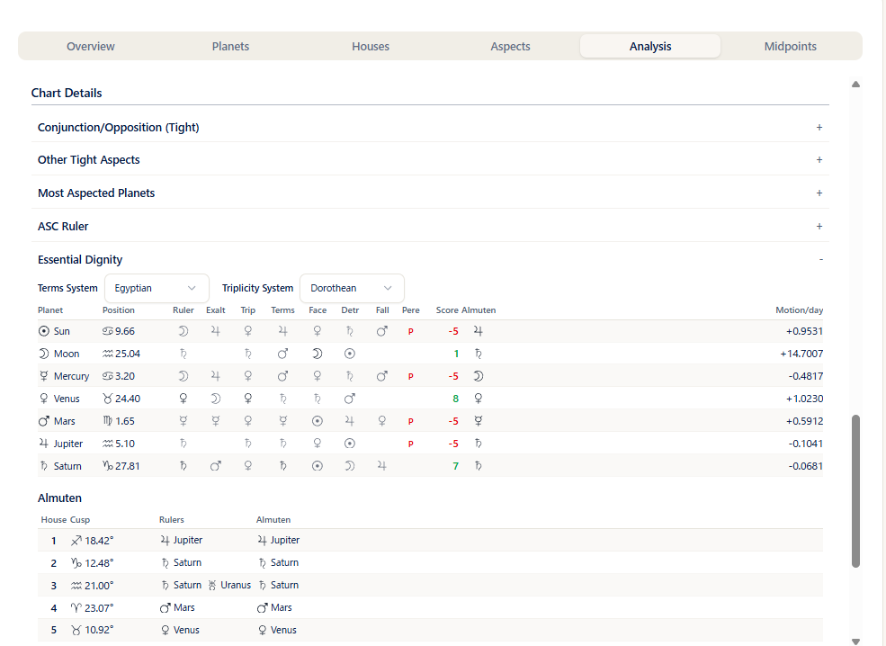
Opening Essential Dignity shows three things: the system selectors, the dignity table, and the house-cusp almuten table.
System selectors
- Above the table, Terms System (Egyptian / Ptolemy) and Triplicity System (Dorothean / Ptolemy / Lilly) let you switch the system used for the assessment. Switching recalculates the chart automatically and updates the table.
- The switch made here is temporary and is not saved to the preset. If you always want the same system, choose it under "Terms System" and "Triplicity System" in Settings and save it to the preset.
Dignity table
One row for each of the seven planets from the Sun to Saturn, with the following columns.
| Column | Contents |
|---|---|
| Planet | The planet's symbol and name |
| Position | The sign it occupies and the degree |
| Ruler / Exalt / Trip / Terms / Face | The symbol of the planet that holds the rulership / exaltation / triplicity / term / face at that position. When it is the planet of that row itself, the symbol is shown in a dark color (bold); when it is another planet, in a light color |
| Detr / Fall | The symbol of the planet in detriment / fall at that position, shown in the same way as above |
| Pere | A red "P" when the planet is peregrine (holds no dignity) |
| Score | The total of the dignities above. Positive values are shown in green and negative values in red |
| Almuten | The symbol of the almuten at that planet's position (the planet that comes out strongest at that degree when all the dignities are combined) |
| Motion/day | Daily motion in degrees. A negative value means the planet is retrograde |
- The term and triplicity assessments follow the systems selected above.
- Score values: the total of Ruler +5 / Exaltation +4 / Triplicity +3 / Terms +2 / Face +1 (all that apply are added up) and the deductions Detriment −5 / Fall −4. A peregrine planet scores −5 (the peregrine deduction is not applied on top of the Detriment / Fall deductions).
- The point values of essential dignities differ between schools and software programs, so the Score here may not match the numbers from other software or another astrologer's reading.
House-cusp almuten table
Below the dignity table, under the heading Almuten, a table for each house cusp is shown. The columns are House / Cusp (sign and degree) / Rulers / Almuten.
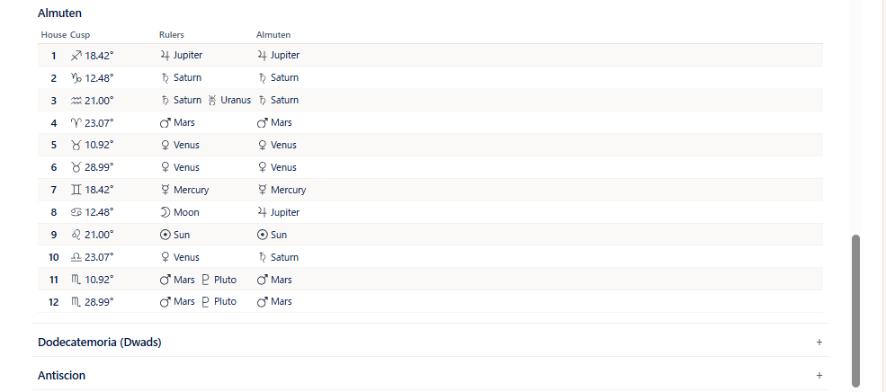
- When the birth time is unknown, the Rulers and Almuten columns are left blank (-).
- The degree notation (decimal / degrees and minutes) follows the degree mode in Settings.
Traditional lists
- Dodecatemoria (Dwads): for each planet, shows Planet / Sign / Dodecatemoria Sign.
- Antiscion: for each planet, shows Planet / Antiscion / Contra-Antiscion (each as sign and degree). This list is shown on every plan. It is a separate item from "Antiscia" in the Traditional (Profections and Lots) chapter (display on the wheel and the contact list; Max).
Seeing it on other screens
- Synastry page (composite and Davison): the Analysis tab in the right panel shows the same content as this chapter (see "Reading the right panel" in the Synastry chapter). When the birth time of either A or B is unknown, the items behave as they do for a natal chart with an unknown birth time. If you switch the Essential Dignity system selectors, press Show Chart again to apply the change. The synastry chart itself has no Analysis tab.
- Progression page: on the Natal (N), Direction (D) / Secondary (P), and Transit (T) tabs in the right panel, the Essential Dignity button at the bottom right of the planet table opens the same table as in "Essential Dignity" above in a separate window (Pro and above). The house-cusp almuten table is included only for Natal (N). The system selectors can be switched there as well.
- Return and Harmonic pages: there is no Analysis tab and no Essential Dignity table.